Canon PIXMA TR4750i review: the best budget all-in-one

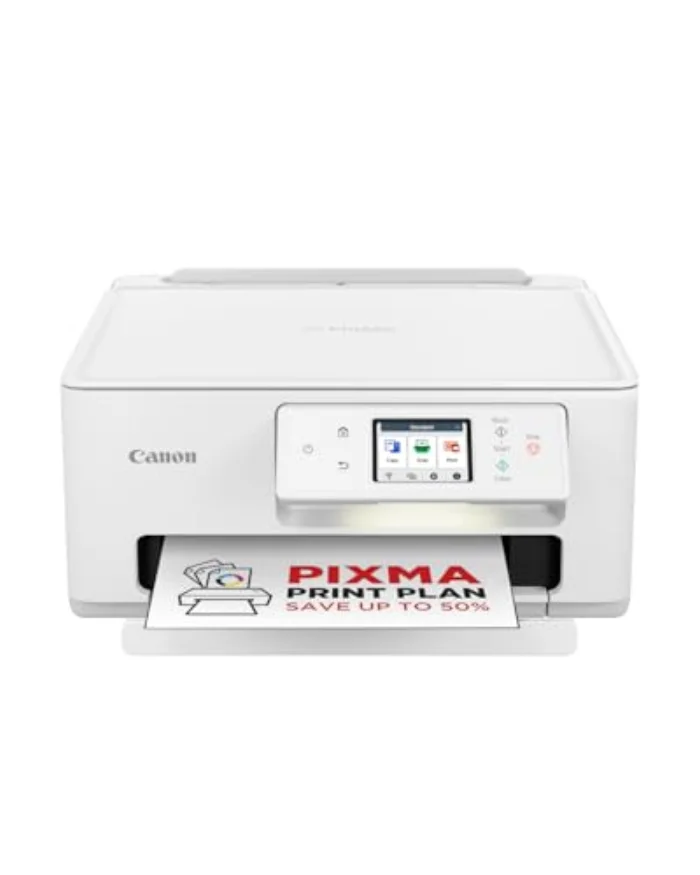
The Canon PIXMA TR4750i packs printing, scanning, copying and even faxing, plus an automatic document feeder, into the cheapest all-in-one on this list. It is the printer to buy when you want every feature for the least money and you only print occasionally. Here is the honest trade-off.

Transparency: This article contains affiliate links. If you buy through one of them, we may earn a commission, at no extra cost to you. That is how we fund our testing and keep this site independent. More about how we test.

Contents

If your printer spends most of its life switched off, waiting for the odd letter, council form or boarding pass, you do not want to spend a lot on it, but you still want it to do everything when the moment comes. That is exactly the gap the Canon PIXMA TR4750i fills. It is a complete office all-in-one at a budget price, and it even includes an automatic document feeder that pricier printers leave out. The catch, as ever with cheap inkjets, is the ink, and being honest about that is the whole point of this review.

Specifications

Model Price TypeFunctionsConnectivity Rating Link
Canon PIXMA TR4750i Wireless All-in-One ★ Top pick Canon PIXMA TR4750i Wireless All-in-One £69.99 Inkjet, cartridgePrint, scan, copy, fax (4-in-1)Wi-Fi, USB, automatic document feeder ★ 4.1 View →
★ Top pick
Canon PIXMA TR4750i Wireless All-in-One £69.99
Type : Inkjet, cartridgeFunctions : Print, scan, copy, fax (4-in-1)Connectivity : Wi-Fi, USB, automatic document feeder ★ 4.1/5
View on Amazon →

Our in-depth review

BEST BUDGET
Canon PIXMA TR4750i Wireless All-in-One - printer Canon

Canon PIXMA TR4750i Wireless All-in-One

4.1/5

£69.99

Inkjet, cartridge · Print, scan, copy, fax (4-in-1) · Wi-Fi, USB, automatic document feeder

  • Lowest price here for a full all-in-one
  • Includes an automatic document feeder and fax
  • Compatible with a low-cost ink subscription
  • Simple to set up over Wi-Fi
  • Cartridge running cost adds up without a plan
  • Build feels lighter than the pricier units
Print quality 4/5
Running cost 3/5
Ease of use 4/5
View on Amazon →

The verdict from Daniel Whitfield, home office and printing tester

The best budget unit. The Canon PIXMA TR4750i gives you a complete all-in-one, including an automatic document feeder for scanning and copying multi-page documents, at the keenest price here. The catch is the usual one for cheap inkjets: cartridges. Pair it with an ink subscription and the per-page cost becomes sensible. If you print only occasionally and want the most features for the least outlay, this is it.

Handles the odd letter, form or boarding pass without fuss, then sits out of the way.

Who is the Canon PIXMA TR4750i for?

This is the right printer if you want a full-featured all-in-one for occasional use at the lowest price. The person it suits prints now and then rather than every day: a household that needs to print, scan and copy the admin of ordinary life but does not churn through reams of paper. For that buyer, paying extra for an ink-tank printer would be wasted money, and the Canon delivers every function, including a document feeder and fax, for very little outlay.

It is not the right printer for heavy printing. As a budget cartridge inkjet, the cost per page climbs quickly if you print a lot, so a high-volume colour home should look at the Epson EcoTank ET-2850 and a text-heavy one at a mono laser. Used as intended, for occasional all-round jobs, it is the most printer you can get for the money.

How the Canon PIXMA TR4750i performs

Features for the price

This is where the TR4750i shines. For the lowest price here you get printing, scanning, copying and faxing, plus an automatic document feeder that lets you load several pages to scan or copy in one go rather than lifting the lid for each sheet. That ADF is a genuine convenience for anyone who occasionally has to digitise a multi-page document, and it is rare at this price.

Print and scan quality

Output is good for everyday needs: text is clean and readable, colour documents are fine, and scans and copies are perfectly serviceable for home admin. It is not a photo specialist, and it does not pretend to be; for glossy prints, the HP ENVY Inspire is the better tool. For the letters, forms and copies most people actually print, the Canon is more than capable.

Setup and connectivity

Wi-Fi setup is quick and the printer connects happily to phones and laptops, so the occasional print from a mobile is no trouble. It is the kind of printer you set up once, push into a corner and forget about until you need it, which is precisely what its buyer wants.

Running cost and the ink question

Here is the honest part. Bought cartridge by cartridge as you go, a cheap inkjet like this can cost more in ink over a year than it cost to buy. The sensible answer is an ink subscription, which charges by the number of pages instead of by cartridge and keeps the per-page cost reasonable, especially for colour. If you genuinely only print a handful of pages a month, standard cartridges are fine; if you print more, a plan is well worth setting up, and you should read our cheapest printer to run guide first.

The honest downside: cartridges add up

The TR4750i's weakness is the same as every budget cartridge inkjet: the ink is where the real cost lives. That is not a flaw in the machine, which does a great deal for very little, but it does mean the headline price is misleading if you print a lot. Treat it as the right tool for occasional, all-round printing, pair it with a plan if you print regularly, and it makes complete sense. Print heavily without thinking about ink, and you will spend more than you needed to.
Frequently asked questions

Q
Does the Canon PIXMA TR4750i have an automatic document feeder?

Yes. It includes an automatic document feeder (ADF), so you can load several pages to scan or copy in one go rather than placing each sheet on the glass. At this price, an ADF and a fax function make it a genuinely complete office all-in-one.

Q
Is the Canon PIXMA TR4750i expensive to run?

It can be, if you buy cartridges as you go. The way to keep costs down is an ink subscription, which delivers ink based on how much you print and lowers the per-page cost. If you print only occasionally, the standard cartridges are fine; if you print regularly, a plan or a different printer is worth considering.

Q
Who is the Canon PIXMA TR4750i best for?

It is best for someone who wants the most features for the least money and prints only now and then: the odd letter, form, council document or boarding pass. You get printing, scanning, copying and faxing in one small unit, and you accept that heavy printing would cost more in ink than on an ink-tank or laser printer.

Verdict on the Canon PIXMA TR4750i

The PIXMA TR4750i is our best budget pick because it gives you a complete all-in-one, document feeder and all, for less than anything else here. For occasional home printing, scanning and copying it is hard to fault on value, as long as you go in clear-eyed about the cartridge cost and add a plan if you print regularly. If your printing is heavier, the Epson EcoTank ET-2850 will save you money over time, and for mostly black text a mono laser is cheaper to run. To work out which fits your home best, start with our buying guide and our advice on the best printer for a home office.