Brother MFC-J1010DW review: the best value pick

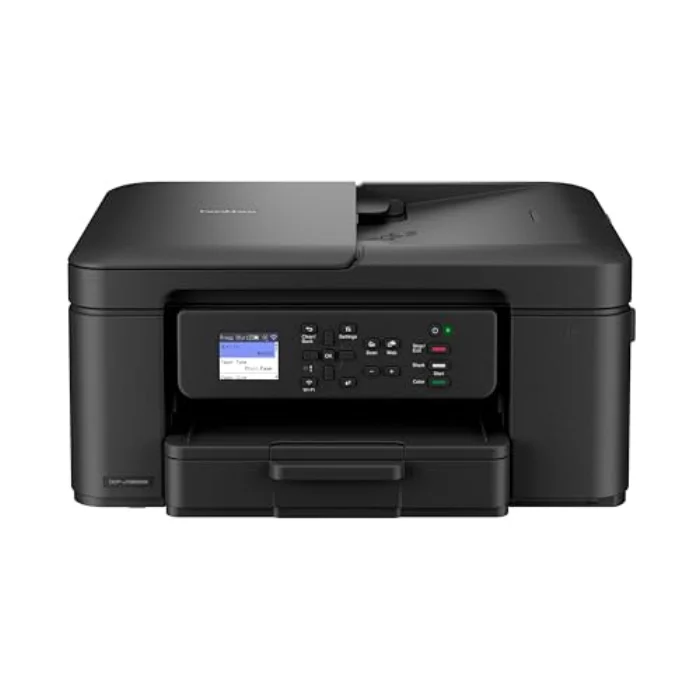
The Brother MFC-J1010DW is the printer we point most people to when they want something that just works, fits a small desk and does not cost a fortune. It prints, scans, copies and even does double-sided printing automatically, all in a body smaller than most. Here is why it is our best value pick.

Transparency: This article contains affiliate links. If you buy through one of them, we may earn a commission, at no extra cost to you. That is how we fund our testing and keep this site independent. More about how we test.

Contents

Brother is the brand small offices quietly trust, the printer that turns up in spare rooms and reception desks across the country and simply keeps going. The MFC-J1010DW distils that reputation into a compact, affordable all-in-one aimed squarely at the home. It does not have the EcoTank's bottomless ink economy or the photo flair of the HP, but it gets the everyday essentials right at a price that makes it the sensible default for a lot of households.

Specifications

Model Price TypeFunctionsConnectivity Rating Link
Brother MFC-J1010DW Compact Wireless Inkjet ★ Top pick Brother MFC-J1010DW Compact Wireless Inkjet £119.99 Inkjet, cartridgePrint, scan, copy (3-in-1)Wi-Fi, USB, mobile printing ★ 4.3 View →
★ Top pick
Brother MFC-J1010DW Compact Wireless Inkjet £119.99
Type : Inkjet, cartridgeFunctions : Print, scan, copy (3-in-1)Connectivity : Wi-Fi, USB, mobile printing ★ 4.3/5
View on Amazon →

Our in-depth review

BEST VALUE
Brother MFC-J1010DW Compact Wireless Inkjet - printer Brother

Brother MFC-J1010DW Compact Wireless Inkjet

4.3/5

£119.99

Inkjet, cartridge · Print, scan, copy (3-in-1) · Wi-Fi, USB, mobile printing

  • Genuinely compact: fits a small desk or shelf
  • Automatic double-sided printing
  • Affordable, widely stocked cartridges
  • Reliable Brother build and support
  • Slower than the EcoTank on long jobs
  • Photo output is good rather than great
Print quality 4/5
Running cost 4/5
Ease of use 4/5
View on Amazon →

The verdict from Daniel Whitfield, home office and printing tester

Our best value choice. Brother is the brand most small offices trust, and the MFC-J1010DW packs the essentials, including automatic two-sided printing, into a small, sensible body at a keen price. Running costs are reasonable for a cartridge inkjet, and the cartridges are easy to find on the high street. If you want a dependable all-rounder without the EcoTank up-front spend, this is the rational buy.

Sits neatly on a small desk and just works whenever you send it a page.

Who is the Brother MFC-J1010DW for?

This is the right printer if you want a dependable all-in-one for a moderate amount of printing and space is tight. It is genuinely small, so it slots onto a shelf, a corner of a desk or into a cupboard far more easily than the chunkier units here, and despite that it still scans, copies and prints, including automatic two-sided printing that bigger, dearer printers sometimes skip. For a typical home that prints a steady trickle of documents and the occasional bit of colour, it covers the bases without fuss.

It is less suited to heavy colour or photo printing. As a cartridge inkjet, running costs climb if you print a great deal, so a high-volume colour household is better served by the Epson EcoTank ET-2850, and a text-heavy one by a mono laser. For moderate, mixed home use, though, the Brother strikes a balance that is hard to beat for the money.

How the Brother MFC-J1010DW performs

Size and design

The first thing you notice is how little room it takes. Brother has clearly designed it for homes where the printer has to share a desk with everything else, and that compactness is a real, daily benefit rather than a spec-sheet line. The plain, unfussy styling helps it disappear into a room rather than dominate it.

Print and scan quality

Text is crisp and clean, well up to the standard you need for letters, forms and schoolwork, and colour documents look good. Photo output is decent rather than outstanding, fine for sticking a snapshot on the fridge but not a match for a dedicated photo printer. The scanner and copier handle the everyday document jobs a home throws at them without drama.

Automatic double-sided printing

This is the feature that lifts the MFC-J1010DW above its rivals at the price. Automatic duplex (two-sided) printing saves paper and looks more professional on longer documents, and finding it on a printer this small and cheap is genuinely unusual. For anyone printing reports, recipes or study notes, it is a quietly useful everyday perk.

Running cost and cartridges

Running costs are reasonable for a cartridge inkjet. The cartridges are affordable and stocked everywhere, and Brother offers higher-yield versions that lower the cost per page if you print more. It will never be as cheap to run as an ink-tank printer, but for moderate use the sums stack up well, and there is no subscription to think about.

The honest downside: speed and ink economy on big jobs

The MFC-J1010DW is built for steady home use, not high volume, so on long print runs it is slower than the EcoTank, and the cartridge economics that are fine for moderate printing become less attractive if you print constantly. Neither is a fault for its intended buyer; they are simply the limits of a small, affordable cartridge inkjet. If you regularly print large colour jobs, size up to the Epson EcoTank; if you print mostly black text in volume, a laser is the better tool.
Frequently asked questions

Q
Is the Brother MFC-J1010DW good for a small desk?

Very. It is one of the most compact all-in-ones you can buy, so it fits a small desk, a shelf or a cupboard easily. Despite the size it still prints, scans, copies and does automatic double-sided printing, which is unusual at this price.

Q
What are running costs like on the MFC-J1010DW?

Reasonable for a cartridge inkjet. The cartridges are affordable and widely stocked, and Brother offers higher-yield options that lower the cost per page if you print more. It is not as cheap to run as an EcoTank ink-tank printer, but for moderate printing it is sensible.

Q
Does the Brother MFC-J1010DW print double-sided automatically?

Yes. Automatic two-sided (duplex) printing is built in, which saves paper and is genuinely useful for longer documents. That feature, on a printer this small and affordable, is a big part of why it is our best value choice.

Verdict on the Brother MFC-J1010DW

The MFC-J1010DW is our best value pick because it gets the essentials right in a small, affordable package, with automatic duplex printing that its rivals at this price often lack. It is the printer to buy when you want a reliable all-in-one for ordinary home use, space is limited and you do not want to overspend. If you print heavily in colour, the Epson EcoTank ET-2850 will cost less to run over time; if you mostly print black text, the HP LaserJet M110we is faster and cheaper per page. For the broad middle of home users, though, the Brother is the smart, low-risk choice, and our home office guide and buying guide can help you confirm it suits you.